PS5 vs PS5 Pro: is the upgrade worth it?
The PlayStation 5 (PS5) and the PlayStation 5 Pro (PS5 Pro) play the same games, and the Pro costs more, so the question is what the extra money buys. For most players, the standard PS5 stays the better default. The Pro pays off when you keep facing the same trade-off in the games you play: a blurrier picture or 30fps.
The Pro makes particular games more comfortable to play, but it does not make the whole library feel new.
Standard PS5 here means the original and Slim models, in disc and Digital Edition versions. The table compares the original PS5 with the PS5 Pro, while Slim and Digital Edition versions may differ from the original in size, drive or storage. Both consoles are sold refurbished on refurbed.

The differences that matter, side by side
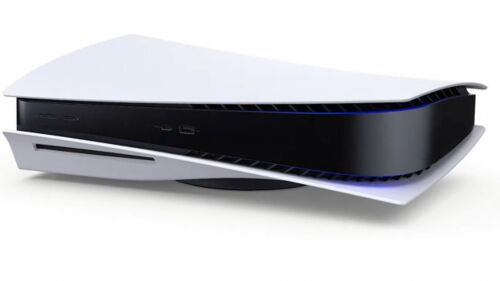
From 767,00 €
Processor
AMD Zen 2
Graphics Card
AMD Radeon Graphics
RAM
16 GB GDDR6
Connectivity
WiFi 802.11a/b/g/n/ac/ax, Bluetooth 5.1
Connectors
USB-C 3.1, 2 x USB-A 3.1, USB-A 2.0, Gb LAN, HDMI 2.1
Optical Drive
Blu-ray Disc
Weight
4500 g
Dimensions
260 x 390 x 104 mm

AMD Zen 2
AMD Radeon Graphics
16 GB GDDR6
WiFi 802.11a/b/g/n/ac/ax/be, Bluetooth 5.1
USB-C 3.1, USB-C 2.0, 2 x USB-A 3.1, Gb LAN, HDMI 2.1
None
3100 g
216 x 388 x 89 mm
Four games illustrate the Pro's gains and limits in graphics and smoothness
The table lists the same processor, graphics family and memory for both consoles, which hides the difference. The Pro has more powerful graphics hardware, and Sony claims up to 45% faster rendering, though that is not a higher frame rate in every game. Two limits apply. The processor still uses Zen 2, so extra graphics power cannot bring a game to 60fps when its simulation or CPU workload is the limiting factor. A picture reconstructed to 4K is not necessarily rendered in native 4K. Four games show how the Pro can improve image quality and smoothness, even if you still have to choose between them.
Final Fantasy VII Rebirth (FF7 Rebirth): the Pro fixes an irritation. On a standard PS5, the game's performance mode became a defining example of the choice between sharpness and smoothness. The Verge singled out the Pro's improvement as unusually visible, even from a distance. If blur bothers you throughout a long game, this is the strongest argument for the Pro.
Horizon Forbidden West: a 60fps showcase. Guerrilla, the studio behind the game, says the Pro can match or exceed the image quality of the standard console's Quality mode while running at 60fps, twice the frame rate of that mode. That shows the intended benefit more clearly than a teraflop comparison.
Spider-Man 2 and Ratchet & Clank: the choice survives. Both games offer a Performance Pro mode that improves the balance of detail, ray tracing and 60fps, and a Fidelity Pro mode that pushes visual quality further. The better hardware makes the trade-off less stark, but you still have to choose between modes.
PSSR and QSSR: how 2026 software moved the gap
PSSR is the Pro's AI image reconstruction, and Sony began rolling out an upgraded version more widely on 16 March. For supported games using an older version of PSSR, you can also turn on the optional Enhance PSSR Image Quality setting. Digital Foundry examined more than 20 games after the upgrade and found improvements, but also lingering problems and regressions. So check whether a complaint from the Pro's launch still applies to the game's current version.
On 1 October, Sony announced QSSR, a lighter upscaler for the standard PS5. Marvel's Wolverine and Ghost of Yōtei are its first supported games, and each game needs QSSR support, so it does not transform the library on its own.
The Pro still has its hardware advantages, but AI reconstruction alone is now a weaker reason to replace a standard PS5.
Why reviewers disagree about the Pro
Reviewers tried the same Pro but weighed its improvements differently. Take Tabitha Baker: in a hands-on review for GamesRadar+, they preferred playing on the Pro but still wouldn't buy one for their own setup. Liking the upgrade wasn't enough. In Ars Technica's launch review, Kyle Orland often struggled to tell the two consoles apart in direct comparisons, while The Verge's launch review found that viewing distance strongly affected how visible the improvements were. In Tom's Guide's one-year reassessment, the reviewer remained enthusiastic after more than 1,000 hours with the Pro and valued its storage, though they still had to choose between graphics modes.
What matters is whether the improvements make playing more enjoyable from your usual seat. An image can be technically better yet add little at that distance, and you can prefer the Pro and still decide it isn't worth buying. These reviews cover different games, setups and software versions, so treat their launch prices and individual technical findings as history, not as current benchmarks.
What players say: blur, 'I stop noticing', 4K/60Hz
'The blur was the problem.' In a May 2026 discussion on the r/PS5Pro forum, owners described clearer 60fps play as the decisive benefit, particularly after PSSR was upgraded. They were excited by the cleaner picture overall, not by any one reflection or texture.
'I stop noticing once I am playing.' In the same discussion, one owner said they stopped noticing the extra detail after about ten minutes. They said the Pro was desirable if they could comfortably afford it, but hard to justify if it would strain their budget.
'My display is already enough.' In a separate discussion, owners pushed back on the idea that a 120Hz screen is mandatory. Several players said they were happy playing on 4K/60Hz screens.
These are anecdotes from enthusiast forums, not polls or controlled tests. They show what different players value, and they cannot tell you how satisfied the average buyer will be.
Your screen and seat decide what you notice
Will you see the Pro's extra detail from your usual seat? Screen size and viewing distance decide how much your eyes can resolve. Motion matters too: fine detail that flickers when the camera moves can distract you more than a slightly softer still image, so a paused screenshot tells only part of the story.
A 120Hz screen lets you use supported high-frame-rate and balanced 40fps modes. Where supported, variable refresh rate (VRR) can help when frame rates vary. Those options give you more choice, but 4K/60Hz is still a valid way to use the Pro. If you buy an expensive screen just to justify the console, its price adds to the total cost of the upgrade.
The Pro is most likely to make you happy if it fixes something about the picture that already bothers you. Wanting the best version because it's the best can justify a luxury purchase. It's harder, though, to judge whether that upgrade was worth it.
The real cost: owner upgrade vs first-time premium
A first-time buyer compares the Pro with another PS5; an owner pays to replace a console that already plays the same games. A failing console, a good offer for your old one or a strong bundle can tip an owner's sum. Sony announced increases to its global recommended prices from 2 April 2026, so launch-price comparisons mislead and there is no single worldwide premium. Compare real offers for equivalent setups.
An owner's net upgrade cost is the Pro's price plus any extras you need, minus what you get from selling your current console. A first-time buyer's premium is the price of a complete Pro setup minus the price of a complete standard PS5 setup.
Price the setup you will use. Add a disc drive if you buy used games, borrow discs or resell finished games, and a vertical stand only if you want one. The Pro's 2TB SSD counts in its favour only for storage you would otherwise buy: both consoles support M.2 expansion, standard models typically hold 825GB or 1TB depending on the model, and the Pro's system software uses part of its 2TB. Unused capacity has little value to you.
A refurbished console is professionally checked, cleaned and reconditioned before it is sold again. The refurbished PS5 buying guide helps you choose between the standard models.
Which console fits which player, and a test before you buy
Your games, your screen and your budget decide whether the Pro is worth buying.
- Your games already look good and run well on your PS5: Keep it. The Pro won't fix much that bothers you.
- You keep choosing between blur and 30fps in supported games: Pick the Pro, which addresses that trade-off.
- You're buying your first PS5 and have a flexible budget: Consider the Pro if several enhanced games are on your list.
- You need to budget for both hardware and games: Choose the standard PS5. More games may bring you more enjoyment than seeing the same games look better.
- You play at 4K/60Hz and want a steady 60fps: Either console could suit you, depending on the games.
Before you pay for the Pro, pick the three games you will play next. For each, check for a current Pro patch and the available modes, then watch recent gameplay footage. Compare the mode you would use on a standard PS5 with the one you would use on the Pro, because mode names can hide very different trade-offs, and ask whether the improvement matters throughout play from where you usually sit. If you have to zoom in and compare repeatedly to spot it, the extra cost buys only a subtle refinement. If blur or poor responsiveness keeps distracting you, a well-implemented Pro mode can be worth it over many hours of play.
The standard PS5 remains an excellent default; the Pro suits you if you want a better image at a responsive frame rate. You can browse the refurbished PS5 Slim, PS5 Digital Edition and PS5 Slim Digital Edition, and the PS5 vs Xbox guide helps if you are still choosing a platform.
PS5 vs PS5 Pro FAQs
Do I need a 120Hz TV to use a PS5 Pro?
No. A 4K/60Hz screen is a valid option for the Pro, and several players say they're happy with their 4K/60Hz screens. A 120Hz screen gives you access to supported high-frame-rate and balanced 40fps modes.
Does the PS5 Pro run every game at 60fps?
No. The Pro still uses a Zen 2 processor, so extra graphics power cannot guarantee 60fps if a game's simulation or CPU workload holds back its frame rate. What you gain depends on the game, the mode you pick and what limits its performance.
Does the PS5 Pro have a disc drive?
No. The Pro ships without a disc drive, but you can buy one separately; standard PS5 disc models include one. If you buy used games, borrow discs or resell games you've finished, include the drive in your budget.
Is a standard PS5 still worth buying now that the Pro exists?
Yes. It plays the same game library with the same DualSense controller, and selected games now use the lighter QSSR upscaler. The Pro mainly helps if you keep noticing blur or 30fps in the games you play.
Can the PS5 Pro play my existing PS5 games?
Yes. The Pro plays the same PS5 library and compatible PS4 games with the same controller. Game Boost can improve supported games, but only selected games have dedicated Pro enhancements.
Ready to shop refurbished PlayStation consoles?
Which PlayStation console suits your games and screen? You know what the Pro changes, where its advantages stop and what switching costs; now look at the consoles themselves and choose the one that fits.
refurbed runs a marketplace for refurbished electronics and won the TRIGOS 2022 award for responsible business in the Social Innovation & Future Challenges category.
Every console comes with a minimum 12-month warranty, and the 30-day return window lets you test it on your own games and screen before you decide. Browse the PlayStation consoles and choose yours.


Sign up for our newsletter for the first time and save €15!
Never miss an offer again.
Information about the use of personal data can be found in our Privacy policy.
Get the refurbed app
For iOS and Android



Confirm sign-up
Almost done: We’ve sent you a confirmation email
- © Refurbed Marketplace GmbH
- Accessibility
- T&C
- Privacy Policy
- Imprint
- Legal Notices
- European Data Act
- Cookie Policy